
Product walkthrough
A tour of the main screens.
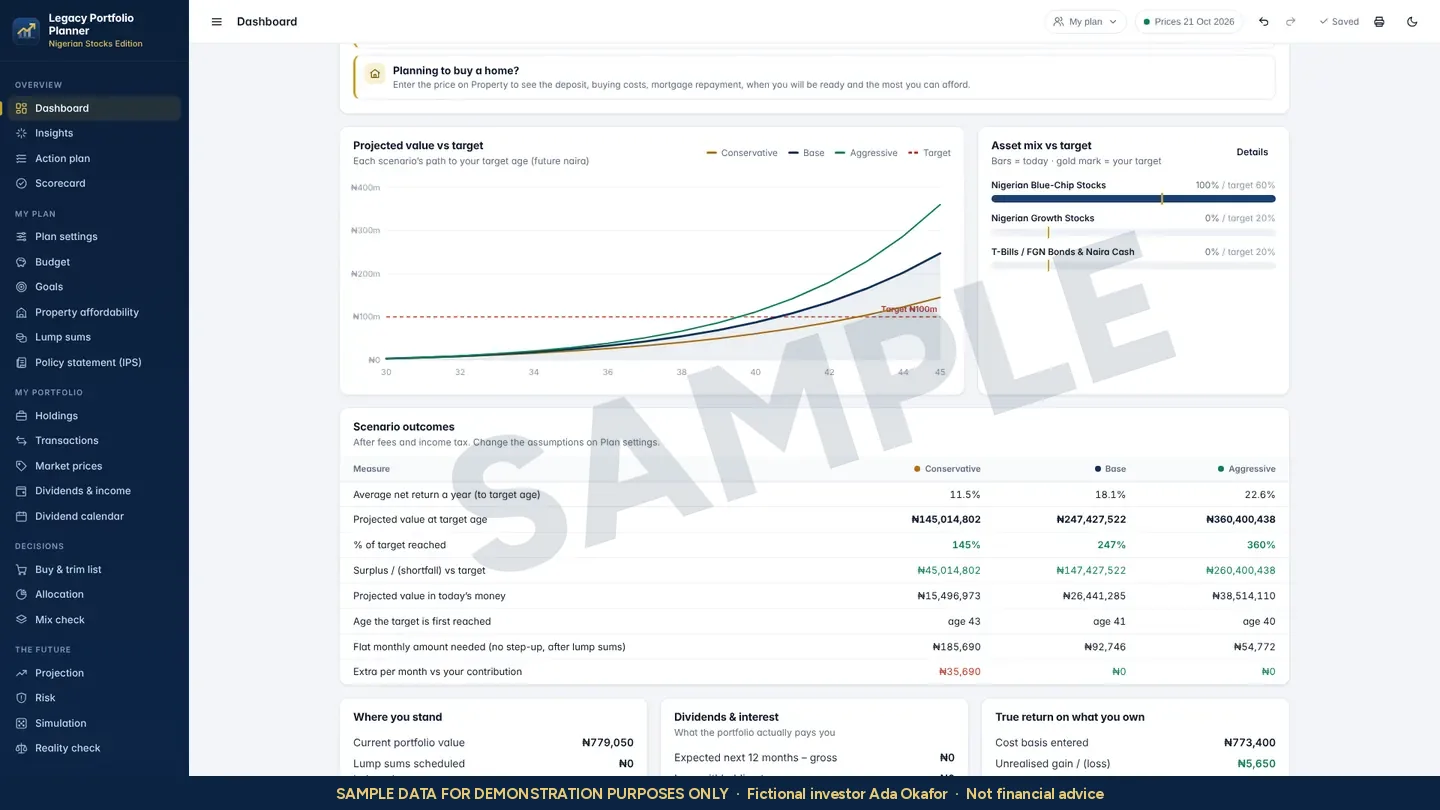
Your whole plan on one screen
Where the plan stands today, what each scenario implies by the target age under your assumptions, and what would close any gap.
SAMPLE DATA FOR DEMONSTRATION PURPOSES ONLY. Screens show Ada Okafor, a fictional investor. Holdings are anonymised and every projection is an illustration of assumptions, not a forecast.
Why try the demo first
Know exactly what you are buying.
The demo is the same planner you receive with a licence, loaded with a sample plan. Use it to check that the screens, terms and workflow suit the way you invest.
- No installation. Runs in any current browser on a computer, tablet or phone.
- No sign-up. There is no account to create and no personal data to enter.
- Safe to experiment. Change any figure; the sample plan resets when you leave.
- Same screens as the licensed app. Dashboard, holdings, dividends, scorecard, simulation and more.
Example workflows
Three things to try in the demo.
Each workflow follows how Ada Okafor, our fictional investor, uses the planner. The demo's own sample plan uses different figures.
Build a first plan
- Open Plan settings and enter a target in today's money and a target age.
- Enter a monthly amount and a yearly step-up.
- Set target weights for each asset class.
- Return to the Dashboard to see the plan summary.
Record a month
- Add this month's purchase in Transactions.
- Log any dividend in Dividends & income.
- Check Allocation for any holding above its limit.
- Note any decision and the reason for it.
Review and hand over
- Work through the Scorecard and clear any Gap you can.
- Update and re-sign your Policy statement.
- Run the Stress test with this year's assumptions.
- Save a backup file and store it with your will.
Legacy Portfolio Planner Academy
Learn the planner one short lesson at a time.
Follow Ada as she builds her plan step by step. Each lesson is about four minutes, with a quick check at the end.
Getting started
1Getting started2Your first plan in 15 minutes3Finding your way aroundB1Your client profile
Beginner path
B2The legacy targetB3GoalsB4RiskB5Your asset mixB6Is it achievable?B7Your yearly review
Ask for the course after you buy.
Intermediate path
I1What you ownI2Every trade on recordI3Prices that stay currentI4The income engineI5From plan to ordersI6Measuring your returnI7Big money moments
Released module by module.
AI disclosure. Academy lessons are presented by an AI-generated presenter with AI-generated voices. Ada Okafor is fictional, and every figure in the lessons is an example, not a recommendation.